# yaris-obd
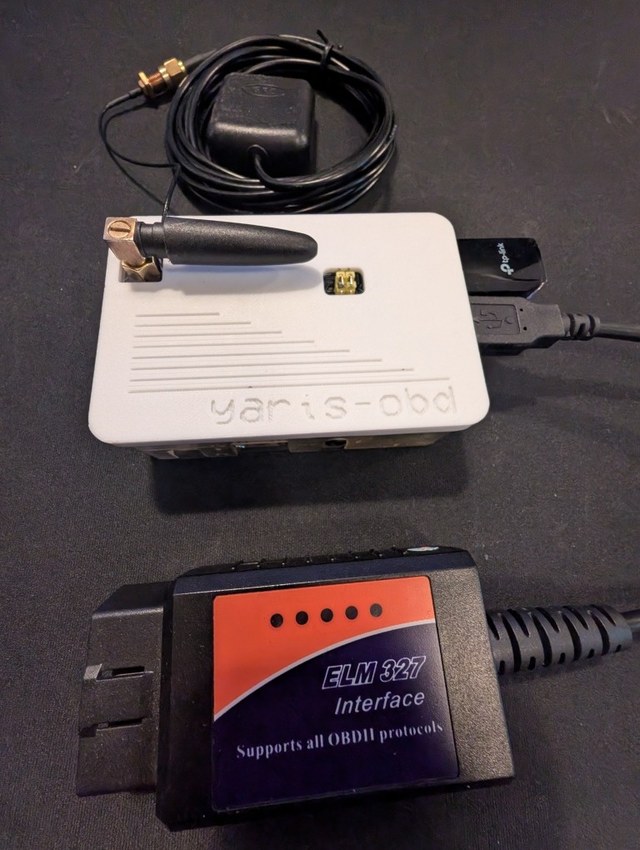
A Raspberry Pi 3-based OBD-II, GPS, and dashcam system for a 2013 Toyota Yaris. Reads live
vehicle data over USB, tracks position with a SIM868 GNSS/GSM HAT, logs everything locally, and
serves a web UI over the car's own WiFi hotspot. The dashboard and pre-cached map work fully
offline, while trip data and dashcam footage sync to a self-hosted remote server whenever an
internet uplink is available.
**rené lévesque bangers**
i have a dream
[](https://open.spotify.com/playlist/5u9vSw39FrIz7KghBkmgH4)
## Screenshots
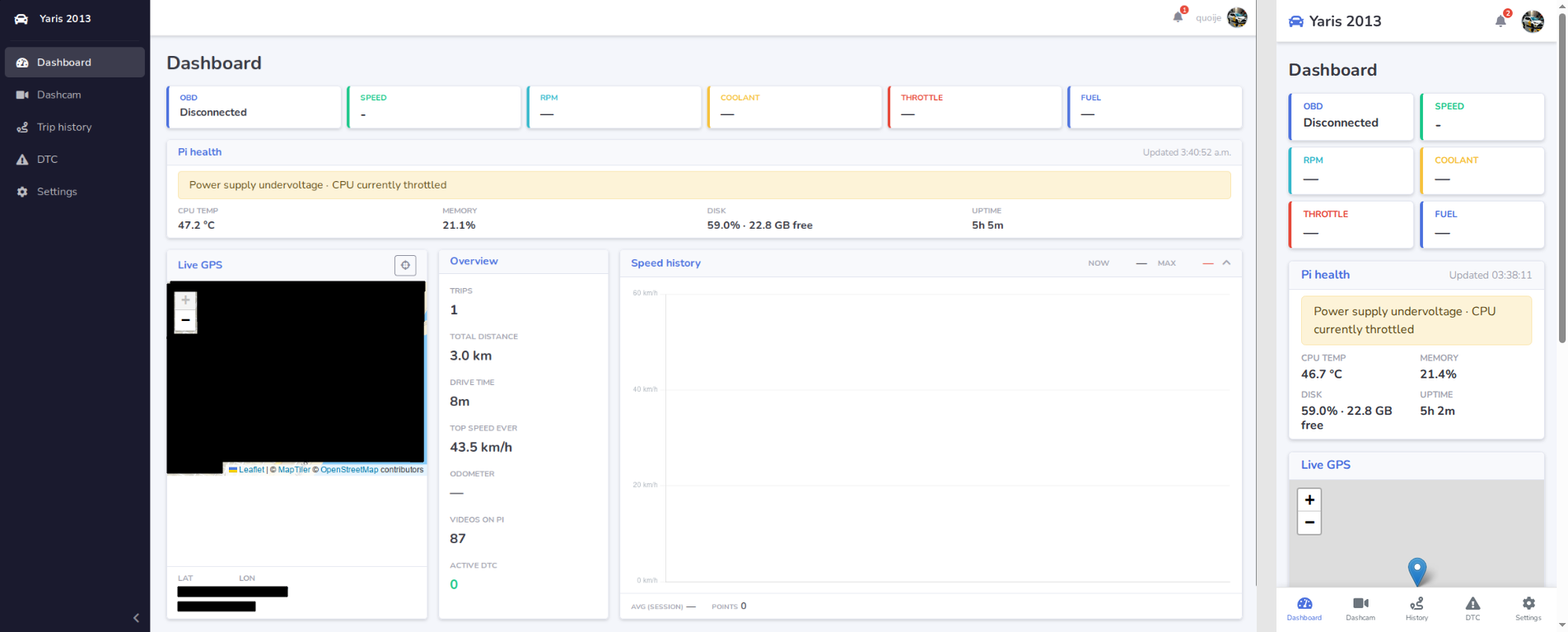
Dashboard — mobile (390 px) and desktop (1280 px):
## Features
- **Live OBD-II data** over a cheap USB ELM327-compatible adapter: speed, RPM, coolant
temperature, fuel level, throttle position, MIL status, stored DTCs, and odometer when the ECU
supports it. Includes automatic background reconnects, serialized queries, and clear
adapter/ELM327/ECU diagnostics
- **Real GPS tracking** via a Waveshare SIM868 GNSS/GSM/Bluetooth HAT, plotted live on an
offline Leaflet map (pre-cached map tiles — no internet needed in the car). The module powers
itself on through the HAT's GPIO PWRKEY wiring after a Pi power cycle
- **Self-hosted WiFi hotspot** so you can load the web UI on your phone from inside the car,
with automatic switching back to home WiFi when it is available (`http://yaris.local` — no
port number)
- **Dashcam file retrieval** — detects a USB dashcam automatically (any brand/folder layout,
no hardcoded device path), mounts it read-only, and safely copies footage locally. Verified
against a real 28GB/87-file import. The web UI can also browse, sort, and delete individual or
all videos directly from the connected dashcam with confirmed, temporary read-write operations,
plus import one file or any checkbox selection instead of always importing the whole card
- **Local video library** — browse imported clips with cached thumbnails and upload status,
play H.264 footage inline with seeking, and delete only the local Pi copy. Optional retention
can automatically remove older local copies after their exact content is confirmed uploaded
- **Remote upload** — a self-hosted server (Flask + Postgres, `server/`) receives trip/GPS
logs and dashcam footage over the internet (via Cloudflare Tunnel or a plain port-forward).
Dashcam videos upload in resumable 40MB chunks (works around tunnel body-size limits and keeps
the Pi's memory footprint flat regardless of file size); a UI toggle can pause dashcam uploads
independently while trip logs keep syncing
- **Remote web portal** — a login-protected browser portal at the same server URL:
trip history with OSM/CARTO live map and route replay, dashcam archive browsing with inline
video player and Range-request seeking, overview stats dashboard, delete buttons for trips and
clips, and a device-settings page for editing the synced owner/car/avatar values that the Pi
pulls from the server. The portal can register/delete multiple devices, reveal a one-time API
key at creation/rotation time, and request a sync for a selected device. When the Pi has
Sync with server enabled, those identity changes hot-reload into the running local UI on the
next successful sync instead of waiting for a manual restart. Shared `history.js` code runs on
both the Pi and the server — tile source and zoom limits are configured per-deployment via HTML
data attributes
- **Optional cellular fallback** through the SIM868 for small trip-log uploads when normal
WiFi/Ethernet is unavailable (dashcam video stays off cellular)
- **Dedicated local status page** with live Pi health, service states, uplink/server/GPS/OBD
diagnostics, plus quick actions for server test, sync-now, uplink reconnect, and app restart
- **Motion-aware local-first** SQLite logging — five-second motion checks without five-second
parked writes, plus retry-safe remote sync and automatic backoff
- **Pi health + diagnostics** — a dedicated local Status page shows temperature, RAM, disk,
uptime, undervoltage/throttling warnings, service state, uplink/server reachability, GPS state,
OBD presence, and safe quick actions
- **Offline-first alerts** — a notification bell on every page reports check-engine state,
storage pressure, upload backlog, temperature/power faults, and GPS loss while moving. Optional
ntfy delivery is available but remains disabled until configured
- **Trip history and route replay** — detects motion from OBD wheel speed with sustained GPS
displacement as a fallback, summarizes distance and speed in metric units (km / km/h), and replays
each route as a line on the offline map with a timestamped play/pause timeline, moving marker, and
live reverse-geocoded location name during scrubbing. Tap any trip row on mobile to load the route
- **Offline reverse geocoding** — a `/api/geocode` route on the Pi uses the `reverse_geocoder`
library (20 MB world dataset, no internet needed) for city/region, and upgrades to Nominatim
street-level when an internet uplink is available. Results are LRU-cached in-process. The browser
never calls any external geocoding service
- **Offline web UI** built with Flask, Jinja, Bootstrap 5, Socket.IO, Chart.js, and Leaflet,
all served locally with a shared responsive page shell
- **Headless Pi deployment** as a self-restarting `systemd` service with a 10-second BCM2835
hardware watchdog, verified across a real reboot
## Hardware
| Part | Notes |
| --- | --- |
| Raspberry Pi 3 Model B Rev 1.2 | Web UI host, logger, uploader, and WiFi hotspot |
| Waveshare SIM868 HAT | GNSS (GPS) + optional GSM/GPRS uplink, unused Bluetooth |
| USB OBD-II adapter | PL2303-based, ELM327-compatible (originally Bluetooth, switched to USB) |
| TP-Link Archer T3U (RTL8812BU) | USB WiFi dongle — AC1300 dual-band, replaces onboard wlan0 for hotspot + uplink |
| USB dashcam | Any brand — detected as generic USB mass storage |
| 2013 Toyota Yaris | The patient |
See [PLAN.md](./PLAN.md) for full hardware bring-up notes (SIM868 jumper/UART setup, antenna
gotchas, etc.) and the detailed project history.
## Getting started
```bash
python3 -m venv venv
source venv/bin/activate
pip install -r requirements.txt
python3 app.py
```
The app serves on `http://:5000`. On the Pi it runs as a `systemd` service and is reachable
with no port number at `http://yaris.local` after installing the mDNS and port-redirect setup.
Deployment helpers for the app service, hotspot watcher, port redirect, and hardware watchdog are
in [deploy/](./deploy). For a clean-install walkthrough on a fresh Pi, use
[deploy/readme.md](./deploy/readme.md). See [PLAN.md](./PLAN.md) for the full hardware/project history.
For the remote server (receives trip logs + dashcam uploads), see [server/README.md](./server/README.md).
## Customizing device identity
The Pi displays an owner name, car model, device name, and avatar. You can manage those values in
two ways:
- **Locally on the Pi** through the Settings page
- **From the server portal** when **Sync with server** is enabled on the Pi
The local fallback/default source remains [config/device.json](./config/device.json), so the car
still boots with sensible identity values even when fully offline.
### Edit device configuration
Edit [config/device.json](./config/device.json):
```json
{
"owner_name": "quoije",
"car_model": "Yaris 2013",
"device_name": "Yaris OBD",
"avatar_path": "img/yaris.png"
}
```
| Field | Location | Purpose |
|-------|----------|---------|
| `owner_name` | Top-right of app topbar | Your name/username |
| `car_model` | Left sidebar (next to car icon) | Vehicle model/year |
| `device_name` | Local settings / remote portal | Device identity used by server sync/provisioning |
| `avatar_path` | Top-right avatar circle | Profile picture (relative to `static/`) |
If you edit the JSON file directly, restart the app:
```bash
# If running as a systemd service:
sudo systemctl restart yaris-obd.service
# If running manually:
# Ctrl+C and python3 app.py
```
### Changing the profile picture
Option 1: Replace the default image file:
```bash
cp /path/to/your/image.png static/img/yaris.png
```
Option 2: Add your image to `static/img/` and update `avatar_path`:
```json
{
"avatar_path": "img/my-avatar.png"
}
```
### Important: Username and database filename
The local SQLite database filename is based on `owner_name`: `db/sql/_.db` (via [modules/app_sql.py](./modules/app_sql.py)).
If you **change `owner_name`** and already have trip data:
- The app will create a **new database** with the new name
- Your old database remains at `db/sql/quoije_Yaris2013.db` (orphaned)
To preserve your data:
```bash
# Option 1: Rename the database file
mv db/sql/quoije_Yaris2013.db "db/sql/YourName_YourCar.db"
# Option 2: Start fresh
rm db/sql/quoije_Yaris2013.db
```
## Project status
The Pi app, remote server, and device sync are all implemented and verified on real
hardware. Phase 25 (road test) is complete; Phase 26 (bug fixes) is in progress
(6 resolved, 4 open). Phase 27 (features) and Phase 28 (Android) follow.
Full phase history and verification notes live in [PLAN.md](./PLAN.md). Open issues in
[BUGS.md](./BUGS.md). Feature requests in [FEATURES.md](./FEATURES.md).
## Diagnostics & recovery
If something goes wrong in the car, SSH in and run:
```bash
bash ~/app/yaris-obd/scripts/diagnose.sh # read-only health check
bash ~/app/yaris-obd/scripts/diagnose.sh --fix # attempt auto-fix
```
Checks service state, OBD/UART hardware, disk/DB health, upload backlog, Pi throttling, and
prints a cheatsheet of recovery commands. Exit code = number of critical issues found.
## Hardware photo